 NotchBuddy
Stripe sales notifications in your Mac's notch
Stop refreshing the Stripe dashboard. Connect a read-only restricted key and every new payment lands in your notch with the amount, a cha-ching and a very surprised pet.
Part of the Revenue tool ↗- What it shows
- Sales and subscription activity, plus MRR from active subscriptions.
- How often
- Every 3 minutes. Stripe counts API reads against a monthly allowance, so NotchBuddy stays well inside it.
Connect Stripe.
rk_live_…Enter this in NotchBuddy on your Mac.- In Stripe, open Developers → API keys → Create restricted key.
- Set Events and Subscriptions to Read. Leave everything else as None.
- Copy the rk_live_… key and paste it into NotchBuddy → Revenue → Stripe. An rk_test_… key works too, for test mode.
What a Stripe sale looks like
When a new payment comes in, the notch drops a small pill with the amount and what it was (a sale, a renewal, a new trial), your pet jumps, and you hear a cha-ching. With Show Peek after an alert on, the Peek opens 1.3 seconds later with the product and a shortened customer email, then tucks itself away. Refunds and failed payments get their own alert, so they don't blend in with good news.
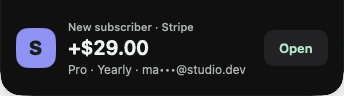
You choose the sound: a classic cha-ching, falling coins, a soft chime, or your own file. If you work in public, turn on Hide amounts in Glance and the pill shows the alert without the number; the amount stays in the Peek and the Revenue panel.
Today's takings, one hover away
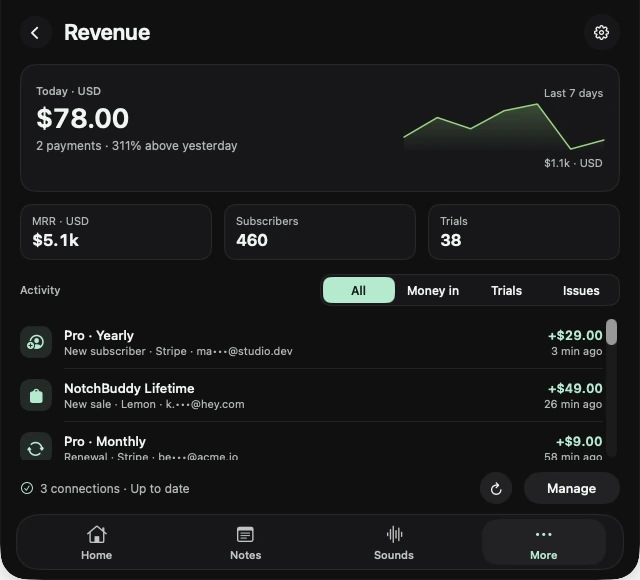
Open Revenue from Home and you get today's total with a seven-day line, MRR, active subscribers and trials where the platform provides them, and the latest payments. Connect more than one platform and they sit side by side.
Your key stays on your Mac
- The key is stored in your Mac's Keychain, not in a file and not on our servers.
- NotchBuddy uses it to talk to Stripe directly. We never see your key, your customers or your sales.
- Payments are kept on your Mac for 31 days, with customer emails shortened (like jo•••@gmail.com).
- You can remove the connection in NotchBuddy, or revoke the key in Stripe, at any time.
Questions, answered.
Can NotchBuddy change anything in my Stripe account?
Not if you follow the steps on this page. You create a key that can only read, so NotchBuddy can see payments and totals but can't refund, cancel, edit or create anything.
Does it work if I sell on more than one platform?
Yes. Connect as many as you use. Each connection keeps its own key and schedule, and the Revenue panel shows them together.
Why a restricted key and not my secret key?
A restricted key can be limited to reading events and subscriptions. Your secret key can do everything, and no desktop app needs that.
Do test payments show up?
Yes, if you connect an rk_test_… key. Use a live key for real sales.
Your other platforms.

Revenue and subscription totals. Alerts reflect what changed between syncs.

Orders, renewals, trials, refunds and failed payments, plus 30-day revenue.

Orders, renewals, trials and refunds, plus MRR and active subscriptions.

Transactions, renewals, trials, refunds and failures, plus MRR.

Payments, subscription charges, trials and refunds.

Sales, membership renewals and refunds.
Daily units and proceeds. Apple publishes each completed day, so this is a report, not live.