 NotchBuddy
How to get clipboard history on a Mac
Copied over something you needed? Here's how to get clipboard history on macOS, and how to keep passwords out of it.
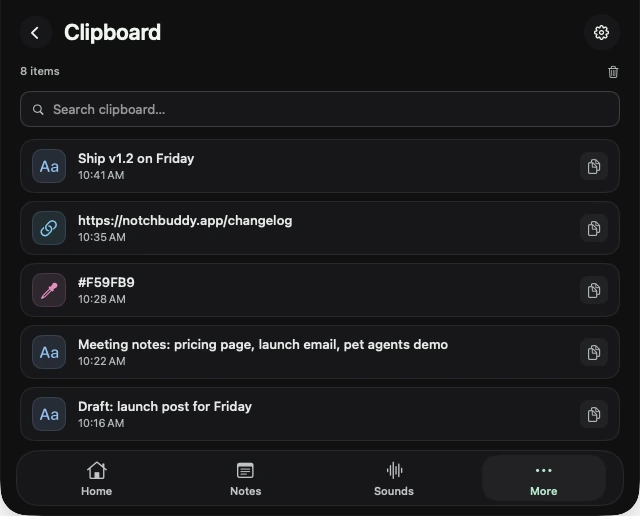
You copy a tracking number, then a link, then a line of code, and the tracking number is gone. For years macOS kept exactly one item on the clipboard. That has started to change, and there are good options either way.
Option 1: Spotlight, on newer macOS
Recent versions of macOS added a clipboard history to Spotlight. If your Mac has it, open Spotlight and switch to the clipboard view to see recent copies. It's built in and needs nothing extra. If you don't see it, your macOS version doesn't include it yet.
Option 2: a clipboard tool in the notch
NotchBuddy's Clipboard keeps a searchable list of what you copied, one hover away. Click an item and it's back on your clipboard.
- Works on macOS 14 Sonoma and later.
- Anything a password manager marks as secret or temporary is never saved.
- History stays on your Mac.
Keep passwords out of it
Whatever you use, check what it does with passwords. Good clipboard tools respect the markers password managers put on copied secrets and skip those items entirely.
How clipboard tools know what's a password
Password managers mark what they copy with special types that say "this is concealed" or "this is temporary". A well-behaved clipboard tool reads those markers and never stores the item. NotchBuddy's Clipboard does exactly that, so your passwords never end up in the list.
Two Terminal commands worth knowing
macOS has had clipboard commands in Terminal for decades. pbpaste prints what's on the clipboard, and pbcopy copies whatever you pipe into it, for example cat notes.txt | pbcopy. They don't give you history, but they're handy for scripts.
Make history part of your flow
- Copy freely. Stop pasting things into a note "just in case".
- Search by a word you remember, not by scrolling.
- Use the Scratchpad for text you're still editing, and Clipboard for things you've already copied.
- Clear the history before sharing your screen if you copy anything private.