 NotchBuddy
Check your App Store sales on your Mac without logging in
Stop logging into App Store Connect to check yesterday's numbers. A Sales-role API key puts them in your Mac's notch.
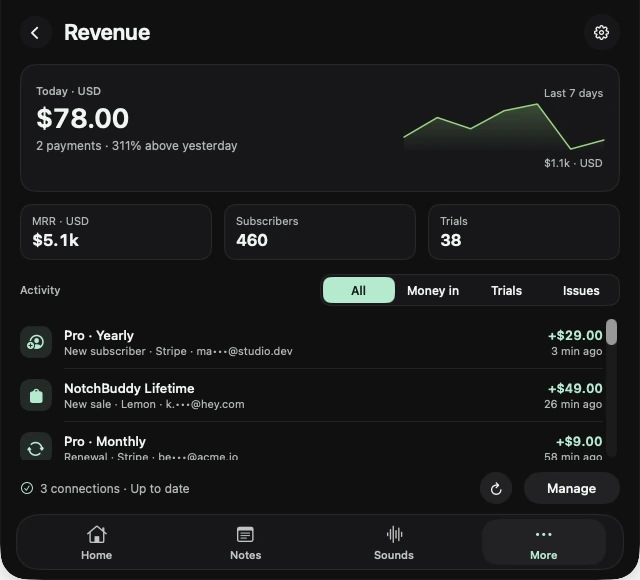
If you ship apps, you probably open App Store Connect every morning to see how yesterday went: log in, two-factor, Sales and Trends, wait for the chart. It's a five-minute ritual for two numbers.
How Apple publishes sales
Apple's sales reports cover one completed day at a time and usually appear the next morning, US time. There's no live feed of App Store purchases in App Store Connect, so any tool that reads it (including ours) shows yesterday, not the last five minutes.
Set up a Sales-role key
- Create the key
App Store Connect → Users and Access → Integrations → App Store Connect API → Team keys. Create a key with the Sales role.
- Download the .p8
Apple lets you download it once. Keep it safe.
- Collect three IDs
The Issuer ID and Key ID from the keys page, and your Vendor number from Payments and Financial Reports.
- Connect it
In NotchBuddy → Revenue → App Store Connect, enter the IDs and choose the .p8. It's stored in your Mac's Keychain.
NotchBuddy then checks every few hours for the newest completed day and shows its units and proceeds in the notch and in the Revenue panel.
Want live alerts too?
If your in-app purchases and subscriptions run through RevenueCat, connect RevenueCat as well. It reports revenue, MRR, subscribers and trials every few minutes, so you hear about changes the same day.
Units and proceeds, explained
Units are downloads and purchases counted in the report. Proceeds are what you earn after Apple's commission, before tax and currency adjustments on your final payment. Proceeds are the number to watch day to day; your monthly payment from Apple will differ slightly.
Keep the key narrow
Use a team key with the Sales role only. It can read sales reports and nothing else, so it can't change your apps, prices or users. If you ever need to, revoke it in App Store Connect and the key stops working immediately.
Selling outside the App Store too?
Many indie developers sell a direct version through Stripe, Paddle, Lemon Squeezy or Gumroad as well. Connect those too and NotchBuddy shows everything in one Revenue panel, with live alerts for the platforms that support them.