 NotchBuddy
Stripe Sales in Your MacBook Notch, With a Desk Pet
A restricted Stripe key puts each sale, renewal and trial in the MacBook notch, with a sound and a desk pet that reacts. Setup uses the same steps as the Stripe integration page.
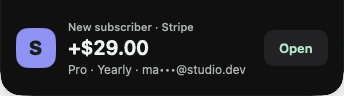
Last checked against NotchBuddy's integration pages on 1 November 2026.
NotchBuddy puts Stripe sales in the MacBook notch: a small pill with the amount, a cha-ching, and a desk pet that reacts. General ways to get Stripe alerts on a Mac, such as the Stripe app, email rules or webhooks into Slack, are in How to get Stripe sales notifications on your Mac. This post is the notch approach, and the other payment sources NotchBuddy reads.
What it looks like
NotchBuddy puts a desk pet in the notch. You choose from five: Pebble the cat, Pip the rabbit, Orbit the visitor, Moss the sprout and Ember the flame. Each has its own walk, hop, float or waddle. Most of the time the pet wanders, naps and stays quiet while you focus.
When a payment comes in:
- A small pill drops from the notch showing the amount and the type: a sale, a renewal or a new trial.
- You hear a cha-ching. You can switch it to falling coins, a soft chime, your own sound file, or no sound.
- Your pet reacts.
Refunds and failed payments get their own alert, so they are not the same alert as a sale.
Open the Revenue panel from the notch and you see today's total, a 7-day line, MRR, subscribers and trials, where the platform provides them.
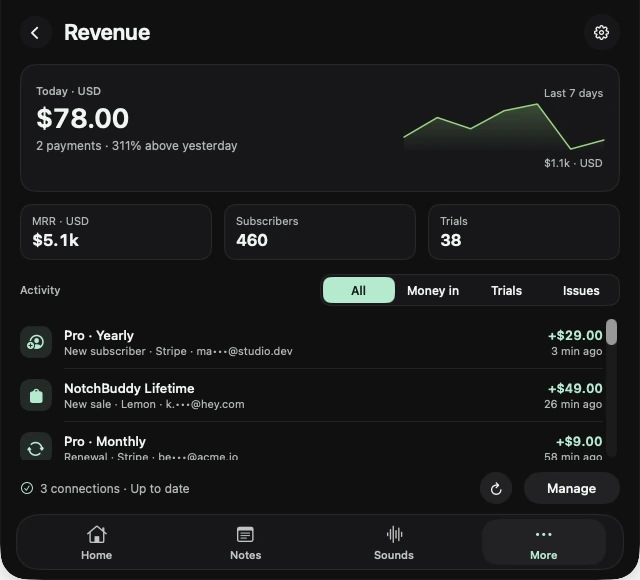
To see the panel before connecting anything, open Revenue and press Preview with sample data. Nothing is connected or saved.
Set it up with Stripe
NotchBuddy uses a restricted, read-only Stripe key, not your secret key. These are the same steps as the Stripe integration page.
- Create a restricted key
In the Stripe Dashboard, open Developers → API keys → Create restricted key.
- Allow reads only
Set Events to Read and Subscriptions to Read. Leave everything else at None.
- Paste the key
Copy the key. It starts with rk_live_. A test-mode rk_test_ key works too. In NotchBuddy, open Revenue → Stripe and paste it.
NotchBuddy checks Stripe every 3 minutes, so an alert can arrive a few minutes after the payment. The key is saved in your Mac's Keychain and is sent only to Stripe.
The other seven sources
NotchBuddy reads from eight sources. Key types below are the ones on each integration page.
| Source | Key | How often |
|---|---|---|
| Stripe | Restricted read-only key | Every 3 minutes |
| RevenueCat | Secret v2 key. Charts metrics and Project configuration set to read-only | Every 5 minutes. Alerts show the change between syncs |
| Lemon Squeezy | API key | About every 90 seconds |
| Polar | Organization access token | About every 90 seconds |
| Paddle | API key | About every 90 seconds |
| Dodo Payments | API key, write access off | About every 90 seconds |
| Gumroad | Access token | Every 3 minutes |
| App Store Connect | Sales-role API key | Daily report, so it shows yesterday |
You can connect more than one. App Store Connect is also covered in Check App Store sales on your Mac.
Keys, storage and screen sharing
The key goes into your Mac's Keychain. Keys are not sent to NotchBuddy's servers. The app talks to Stripe, or the other platform, from your Mac.
Payments are kept on your Mac for 31 days, for the 7-day chart and the Revenue panel, with customer emails shortened.
Turn on Hide amounts in Glance and the pill still tells you a sale came in, without showing the figure. The amount stays in the Peek and the Revenue panel.
A Stripe key restricted to reading events and subscriptions cannot issue refunds, create charges or change the account, if you follow those permission steps.
The pet
You can use the sales alerts without paying much attention to the pet. What the pet actually does:
- Pets nap when nothing is happening.
- Their sounds are a quiet purr, yawn or chirp, a few times an hour at most.
- They do not make a sound during a focus session or while music is playing.
You can change pets and themes from the Home tab. On Macs without a notch, or on an external display, the pet lives in a small pill at the top of the screen. More on the pets page and the desk pet guide. The other notch tools are on tools.
When this isn't the right tool
- You need an alert the same second. Polling every few minutes is not a webhook. Use Stripe webhooks into Slack or another alerter instead.
- You want full analytics. The Revenue panel is a glance. Keep a dedicated analytics tool for cohorts and churn.
- You are mostly on your phone. The Stripe mobile app's notifications will reach you when the Mac is closed.
- You are on macOS 13 or earlier. NotchBuddy needs macOS 14 or later, on Apple silicon or Intel.
NotchBuddy is $10 once from pricing, or a free download with a 3-day trial on the Mac App Store. There is more for solo founders on the indie makers page.
Questions, answered.
Can I get a sound on my Mac for every Stripe sale?
Yes. NotchBuddy plays a cha-ching, falling coins, a soft chime, your own sound, or no sound, when a new sale, renewal or trial arrives from Stripe.
Is it safe to give NotchBuddy my Stripe key?
NotchBuddy uses a restricted key with read-only access to Events and Subscriptions. The key is stored in your Mac's Keychain and is never sent to NotchBuddy's servers.
How quickly do Stripe sales show up?
NotchBuddy checks Stripe every 3 minutes, so a sale usually appears within a few minutes.
Does it work with RevenueCat, Paddle or App Store Connect?
Yes. It supports Stripe, RevenueCat, Lemon Squeezy, Polar, Paddle, Dodo Payments, Gumroad and App Store Connect. App Store Connect data is daily, so it shows yesterday's sales.
Can I hide my revenue while screen sharing?
Yes. Turn on Hide amounts in Glance. You'll still get the alert, without the figure.
Does NotchBuddy alert me about refunds?
Yes. Refunds and failed payments get their own alert, separate from sales.